It is important to plan and measure carefully before placing an order since all items are custom built and cannot be returned (see our return policy). Please review our pages on planning a cabinet order, on home office design, or on planning a bookcase order. If you need assistance or other customization options, email us or check out our Canyon Creek cabinetry and design services program.
Prices and customization options are available on the web site. To find them, click on the links in the "Products & Prices" section to the left side of the page (including Woodcraft (Kitchen & Bath) Cabinets or Bookcases and Wall Units or other furniture).

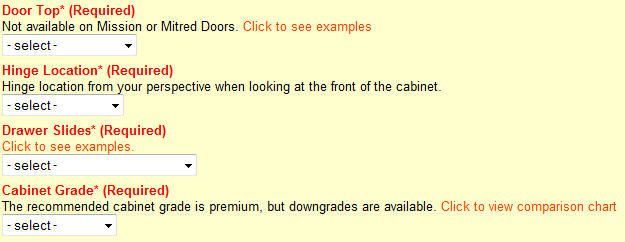
NOTE: Wood species, door style (on cabinets), and all options listed in red require a choice.
Options listed in black are optional and can be ignored.
Some options have their own price that adds to or subtracts from the base price. If you are requesting size customizations or something special, please enter it in the "customization notes" field. Enter the number of items you want and click on the "order" button to place them in your shopping cart. You can also download some catalogs in PDF format. There are many Canyon Creek and Aristokraft items listed that have not yet been added to the web site, but we can provide you pricing on these via email. If you are not ready to order now, register on the site (create a username and password) and create a wish list.
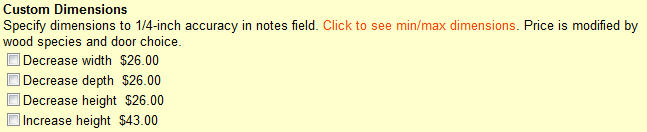
This type of option may increase or decrease the cost of the cabinet by a percentage value. It may also increase or decrease the cost of other options, such as those that change the size of a cabinet:

When you have placed all your items into the shopping cart, you will see the shipping options and price. For estimated delivery times, please see our Shipping and Delivery page. Please ensure you have submitted a valid email address or phone number so we can contact you.
We use PayPal for secure online credit card processing, and you don't need a Paypal account to pay this way. When you complete a transaction using Paypal, your credit card or bank account information will stay private since we never see your account information. If you prefer to pay over the phone, please submit your order using the "Call for Credit Card" option.
After you have submitted and paid for your order, we will send the order to the factory for production. We will provide you an update via email when we find out the date your order will be ready for pickup or delivery. For more details on shipping and delivery, please review our Shipping and Delivery page.
